Workspaces
Menghapus workspace
Menghapus workspace dari halaman Workspaces.
Sebelum mulai
- Menu Workspaces di Settings tampil bila perannya punya izin
workspace:read. - Menu Delete di baris workspace tidak dicek izin di halaman ini.
- Penghapusan permanen. Dialog konfirmasi menyatakan tindakan ini tidak bisa dibatalkan.
Langkah
Buka Settings > Workspaces. Pada baris workspace, pilih menu titik tiga, lalu Delete.

Dialog Are you sure? muncul: "This action cannot be undone. This will permanently delete the workspace ... and all associated data." Pilih Cancel bila tidak jadi menghapus.
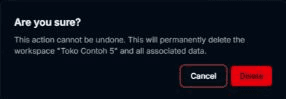
Pilih Delete untuk menghapus workspace.

Hasilnya
Toast Workspace deleted successfully! tampil dan workspace hilang dari daftar. Bila yang dihapus adalah workspace yang sedang dipilih, aplikasi berpindah ke workspace pertama yang tersisa.
Masalah umum
- Failed to delete workspace. Please try again. — penghapusan gagal.