Broadcast
Mengelola nomor uji
Menambah atau menghapus nomor yang menerima pesan uji dari komposer broadcast.
Pesan uji dari tombol Send test… di komposer hanya dikirim ke nomor di kartu Test numbers.
Sebelum mulai
- Butuh akses halaman Broadcast di Settings (izin
broadcasts:manage). - Bila pengiriman uji tidak aktif di lingkungan itu, kartu menampilkan Test sending isn't enabled here. dan form tambah nomor dinonaktifkan.
- Maksimal 10 nomor uji.
Langkah
Buka Settings > Broadcast. Kartu Test numbers menampilkan tabel dengan kolom Label dan Number.
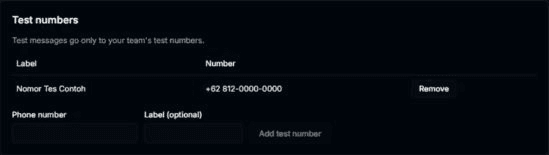
Isi Phone number dan, bila mau, Label (optional). Klik Add test number.

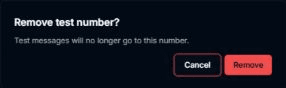
Untuk menghapus nomor, klik Remove di barisnya. Dialog Remove test number? muncul. Pilih Cancel bila tidak jadi.
Hasilnya
- Setelah menambah, muncul Test number added. dan nomor masuk ke daftar. Nomor ditampilkan sebagian tersamar.
- Setelah menghapus, muncul Test number removed. (Test messages will no longer go to this number.).
- Nomor yang sudah ditambah muncul sebagai pilihan di popover Send test… pada komposer.
- Kolom Phone number terisi otomatis bila akunmu sudah punya nomor telepon.
Masalah umum
- No test numbers yet. — belum ada nomor uji.
- Enter a valid WhatsApp number with country code.
- This number is already a test number.
- You can add up to 10 test numbers.
- This number can't receive tests in this environment.
- This broadcast or test number no longer exists. — nomor sudah dihapus pihak lain.
- Couldn't update test numbers. Try again.