Mengelola kontak Stopped promotions
Menambah atau menghapus kontak yang tidak boleh menerima broadcast.
Kontak di daftar Stopped promotions dilewati otomatis di setiap broadcast.
Sebelum mulai
- Butuh izin
broadcasts:manage. Tombol Add contacts hanya tampil bila perannya punya izin itu. - Daftar ini mencakup kontak yang membalas STOP, preferensi dari Meta, error pengiriman, kontak yang ditambah admin, dan hasil impor. Kolom Source menampilkan asalnya: Customer replied STOP, Meta preference, Delivery error, Added by admin, atau Imported.
Langkah
Buka Settings > Broadcast. Kartu Stopped promotions menampilkan tabel dengan kolom Contact, Phone, Since, dan Source. Selama daftarnya kosong tampil No contacts have stopped promotions yet.

Klik Add contacts. Dialog Add contacts terbuka. Bila workspace punya lebih dari satu nomor WhatsApp, pilih WhatsApp number.
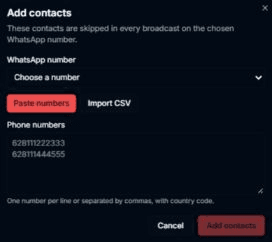
Pilih cara menambah: Paste numbers (satu nomor per baris atau dipisah koma, dengan kode negara) atau Import CSV (kolom pertama berisi nomor telepon; baris header "phone" boleh ada; maksimal 10.000 baris dan 1 MB).

Klik Add contacts di dialog untuk menyimpan, atau Cancel untuk menutup tanpa menyimpan.

Hasilnya
- Untuk menghapus kontak dari daftar, klik Remove di barisnya. Dialog Remove from list? muncul. Pilih Cancel bila tidak jadi.
- Setelah menambah, muncul ringkasan seperti n added, n already on the list, n skipped (invalid). dan dialog menutup. Bila ada nomor yang ditolak, dialog tetap terbuka dengan daftar nomor itu dan tombol Cancel berganti Close.
- Setelah Remove, muncul Removed from the list. dan kontak itu bisa menerima broadcast lagi (This contact can receive broadcasts again.).
- Nomor ditampilkan sebagian tersamar di tabel.
Masalah umum
- No contacts have stopped promotions yet. — daftar kosong.
- Enter at least one phone number. — kolom Phone numbers kosong.
- The list is larger than 1 MB. / The file is larger than 1 MB. / The file is empty.
- Connect an official WhatsApp number first. — workspace belum punya channel WhatsApp resmi.
- Couldn't add these contacts. — penambahan gagal.
- Couldn't remove this contact. — penghapusan gagal.