Combine
Menautkan dua sumber
Menyatakan bahwa field di satu sumber berarti sama dengan field di sumber lain.
Sebelum mulai
- Menu Report tampil di launcher Apps (tile Report tidak dibatasi per workspace).
- Report berlaku per workspace. Tanpa workspace terpilih, halaman menampilkan No workspace selected ("Reports are scoped to one workspace.").
- Minimal dua sumber sudah terdaftar. Kedua sisi harus berupa dimension atau key; measure tidak bisa menjadi kunci.
Langkah
Di kartu Link two sources, isi Short name for the link.

Di blok This side, pilih sumber (Pick a source) lalu field kuncinya (Pick the key).

Di blok Matches this side, pilih sumber dan field pasangannya.

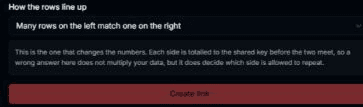
Pilih How the rows line up, lalu klik Create link.
Hasilnya
- Tautan tampil di Existing links; nama dan kedua field pada form dikosongkan.
- Pilihan How the rows line up: Each row matches at most one row on the other side, Many rows on the left match one on the right, atau One row on the left matches many on the right. Pilihan ini yang menentukan sisi mana yang boleh berulang.
Masalah umum
- Kedua sisi menunjuk field yang sama: Both sides point at the same field of the same source, jadi tautan selalu cocok dan tidak menyatakan apa pun. Tombol Create link nonaktif.
- Pick a source first muncul di pilihan field sampai sumbernya dipilih.