Customer Fields
Membuat customer field
Membuat customer field baru untuk workspace.
Sebelum mulai
- Butuh izin
customer_fields:manage. Tanpa izin itu tombol Create Field tidak tampil. - Key dan Type tidak bisa diubah setelah field dibuat. Pikirkan keduanya sebelum menyimpan.
Langkah
Di halaman Customer Fields, klik Create Field.

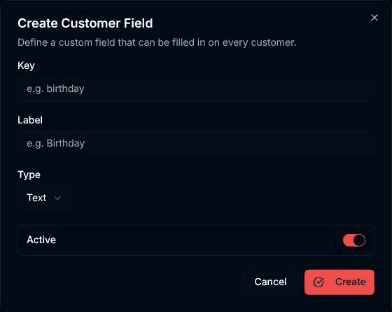
Dialog Create Customer Field terbuka ("Define a custom field that can be filled in on every customer."). Isi Key (contoh isian: birthday), Label (contoh isian: Birthday), dan pilih Type: Text, Number, Date, Yes / No, atau Select (choose one).
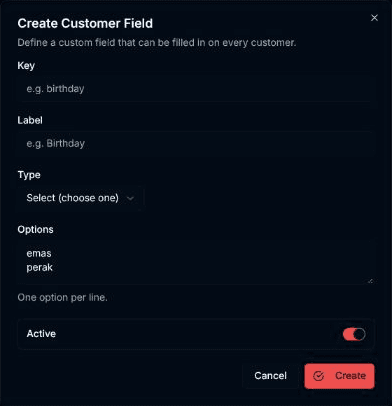
Bila Type = Select (choose one), kolom Options muncul. Tulis satu opsi per baris ("One option per line.").
Atur saklar Active. Saklar menyala berarti status active, mati berarti inactive.
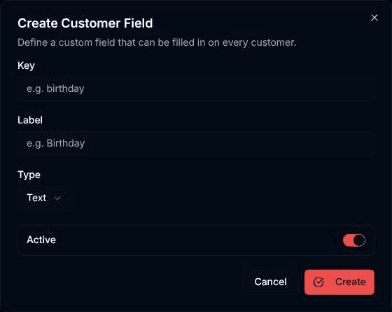
Klik Create. Pilih Cancel bila tidak jadi membuat.
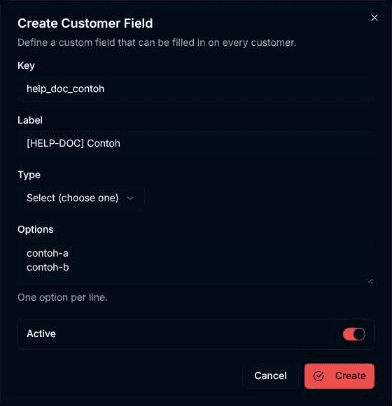
Hasilnya
Dialog menutup, muncul pesan Customer field created., dan field baru tampil di tabel.
Masalah umum
- Key is required atau Label is required — isian kosong.
- Add at least one option for a select field — tipe Select (choose one) butuh minimal satu opsi.
- A field with this key already exists. — Key sudah dipakai.
- You do not have permission to manage customer fields. Ask a workspace owner or admin. — perananmu tidak punya izin kelola.
- Failed to create customer field. — pembuatan gagal; pesan penyebab tampil di dialog.