Overview
Melihat ringkasan chatbot
Membaca status, channel, knowledge, dan hal yang perlu ditindaklanjuti di halaman Overview Chatbot.
Sebelum mulai
- Menu Chatbot tampil di launcher Apps (tile Chatbot tidak dibatasi per workspace).
- Workspace harus sudah punya konfigurasi chatbot. Bila belum, halaman ini langsung mengalihkan ke halaman awal onboarding (
/chatbot/get-started). - Pilih workspace dari pemilih workspace di sidebar. Tanpa workspace, halaman menampilkan Select a workspace.
Langkah
Di sidebar Chatbot, grup Setup, pilih Overview. Judul halaman Overview tampil dengan asisten Nuxi dan status Active atau Inactive.
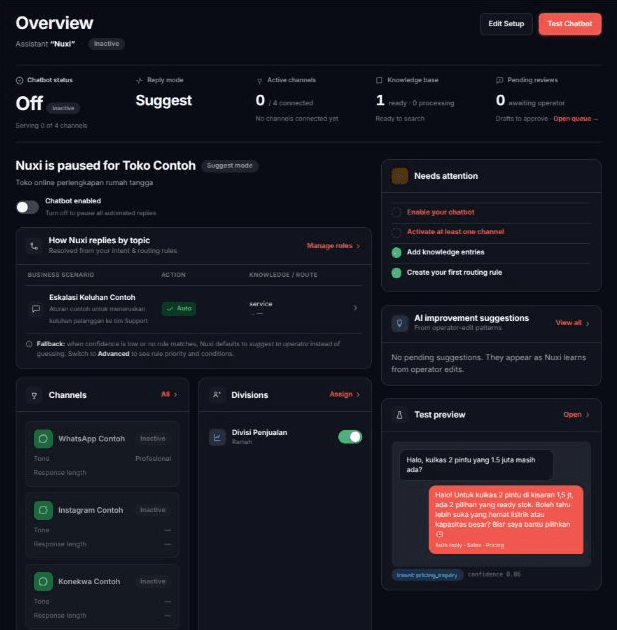
Baca baris kartu di atas: Chatbot status, Reply mode, Active channels, Knowledge base, dan Pending reviews.

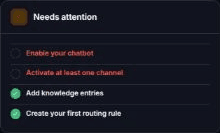
Di kolom kanan, baca kartu Needs attention. Setiap butir yang belum selesai adalah tautan ke halaman yang perlu diisi.
Hasilnya
- Edit Setup membuka Onboarding Setup. Test Chatbot membuka halaman Test Chat.
- Chatbot status menampilkan Active atau Off, dan di bawahnya jumlah channel yang dilayani (Serving ... of ... channels).
- Active channels menampilkan jumlah channel aktif dari channel yang tersambung, beserta namanya.
- Pending reviews adalah tautan ke Conversation Suggestions (Open queue →).
- Kartu How Nuxi replies by topic merangkum aturan balasan per topik (Business scenario, Action, Knowledge / route). Tautan Manage rules membuka Intent & Rules.
- Kartu Channels (tautan All), Divisions (tautan Assign), dan Knowledge base (tautan Manage) masing-masing membuka halaman pengaturannya.
- Kartu AI improvement suggestions menampilkan dua saran teratas dengan Apply, Review examples, dan Ignore. Tautan View all membuka AI Suggestions.
- Kartu Test preview hanya contoh percakapan; tautan Open membuka Test Chat.
- Menyalakan atau mematikan chatbot dijelaskan di Menyalakan atau mematikan chatbot.
Masalah umum
- Select a workspace — "Choose a workspace from the switcher in the sidebar to manage its chatbot."
- Loading chatbot config… — halaman masih memuat.
- Nuxi's config didn't come through — "Something interrupted the connection to the chatbot service — your settings are untouched. This is just a loading hiccup." Pilih Retry.
- Channels didn't load atau Channel voice settings didn't load — pilih Retry.
- Some dashboard data didn't load — "Rules, divisions, knowledge, or suggestions below may look empty because a fetch failed, not because there's nothing there." Pilih Retry.
- No channels connected yet., No divisions configured for the bot yet., No rules yet — Nuxi falls back to the default reply mode., dan No knowledge yet — Nuxi can only answer from general context. adalah kondisi kosong tiap kartu.