Stages
Membuat stage
Membuat stage baru dari halaman Stages.
Sebelum mulai
- Buka CRM dari launcher, lalu pilih Stages di grup Core.
- Tombol Create Stage hanya tampil bila perannya punya izin
stage:create. - Workspace harus sudah terpilih.
Langkah
Di halaman Stages, pilih Create Stage.

Dialog Create New Stage terbuka dengan teks Create a new stage for organizing your workflow. Kolom Workspace terisi otomatis dan tidak bisa diubah.
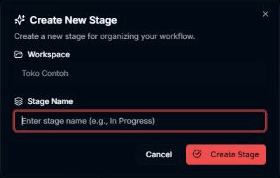
Isi Stage Name (wajib). Contoh isian di kolom: Enter stage name (e.g., In Progress).
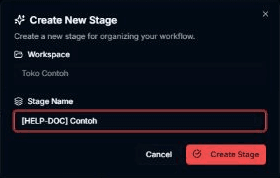
Pilih Create Stage untuk menyimpan. Pilih Cancel bila tidak jadi.

Hasilnya
Dialog tertutup, muncul pesan Stage created successfully!, dan stage baru tampil di tabel.
Masalah umum
- Name is required — Stage Name kosong.
- Failed to create stage. Please try again. — pembuatan gagal; dialog tetap terbuka agar bisa dicoba lagi.