Supervisors
Menambah supervisor
Menambahkan nomor WhatsApp yang diberi tahu saat bot butuh manusia.
Sebelum mulai
- Buka Supervisors.
- Siapkan nomor WhatsApp dalam format internasional, mis.
6281234567890. Nomor itu harus sudah bisa dijangkau lewat channel WhatsApp workspace.
Langkah
Pilih Add supervisor di kanan atas halaman.

Panel Add supervisor terbuka dengan keterangan "Who gets a WhatsApp ping when the bot needs a human".
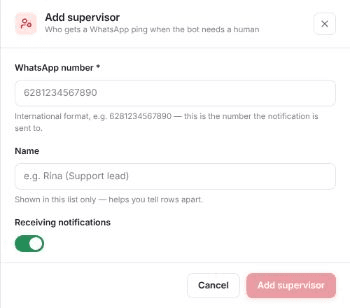
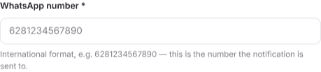
Isi WhatsApp number * (wajib). Petunjuknya: "International format, e.g. 6281234567890 — this is the number the notification is sent to."
Isi Name bila perlu. Nama hanya tampil di daftar ini sebagai pembeda baris.

Atur sakelar Receiving notifications. Matikan untuk menyimpan entri tanpa mengirim notifikasi.

Pilih Add supervisor di bagian bawah panel untuk menyimpan. Pilih Cancel bila tidak jadi.

Hasilnya
- Muncul pesan Supervisor added dan panel tertutup.
Masalah umum
- Tombol Add supervisor di panel nonaktif selama WhatsApp number * kosong.
- Bila gagal, muncul notifikasi berisi pesan dari server, atau teks bawaan Failed to add supervisor bila server tidak memberi pesan.