Membuat flow
Membuat flow baru dengan nama dan akhiran (Otherwise).
Sebelum mulai
- Buka halaman Conversation Flow.
- Flow baru bawaannya Active. Flow aktif yang dibuat lebih awal akan menutupi flow yang lebih baru.
Langkah
Klik Create a flow (bila belum ada flow) atau ikon New flow (+) di kepala kolom Flows. Panel New flow ("Named set of steps with a catch-all ending") terbuka.

Isi Name (contoh isian: "Complaint handling"). Description bersifat opsional ("Optional note for your team.").
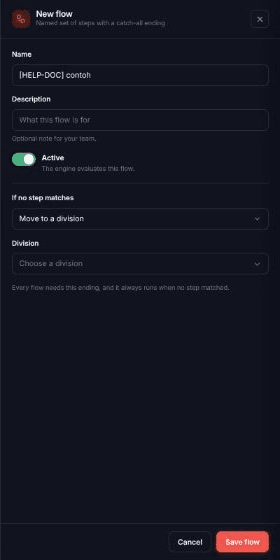
Atur saklar status: Active ("The engine evaluates this flow.") atau Paused ("The engine skips this flow entirely.").

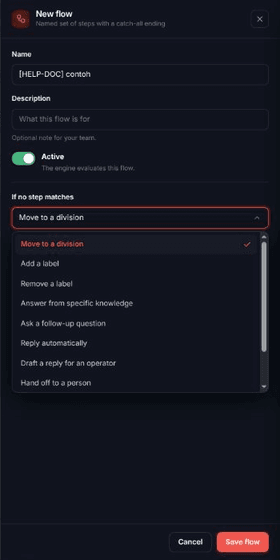
Di bagian If no step matches, pilih aksi akhiran. Pilihannya: Move to a division, Add a label, Remove a label, Answer from specific knowledge, Ask a follow-up question, Reply automatically, Draft a reply for an operator, Hand off to a person, Move to a stage, Apply a communication strategy. Beberapa aksi meminta isian tambahan (division, label, entri pengetahuan, stage, pertanyaan, atau bagian strategi). Setiap flow wajib punya akhiran ini, dan akhiran selalu berjalan bila tidak ada langkah yang cocok.
Klik Save flow.

Hasilnya
Panel menutup, muncul notifikasi Flow created, dan flow baru terpilih di kolom Flows. Flow baru belum punya langkah: "No steps yet. Every conversation goes straight to the ending below."
Masalah umum
- Give the flow a name. — Name kosong.
- Fallback: diikuti pesan, misalnya "choose the division to move the conversation to." — isian aksi akhiran belum lengkap. Pesan lain yang mungkin: "choose a label.", "choose at least one knowledge entry.", "write the question to send.", "choose the stage to move the conversation to.", "fill in at least one part of the strategy.", "choose what the bot should do."
- Bila gagal, muncul notifikasi berisi pesan dari server, atau teks bawaan Failed to create flow bila server tidak memberi pesan.